

Never Lose a Lead: How Inquiries Save Automatically
When a parent starts booking on your public page and only gets as far as their contact details, Tidybash still saves them as an inquiry so you can follow up.
Parents often mean to finish a party request, then get pulled away mid-flow. With a form that only saves on final submit, that parent who was this close vanishes and you never hear from them. Tidybash works differently: the lead is saved early, so you still have someone to call or email.
How it works
Tidybash saves the inquiry as soon as the parent completes the first step of your booking page, not when they hit the final submit.
That first step is their contact details:
First name
Last name
Email
Phone (optional on the public booking page when email is provided)
They have not picked a date, package, or add-ons yet. Even if they stop right there, you already have their contact information in the Hub.
A finished request still includes the full party details. The early save only matters when someone walks away before the end, and that is when most tools would have lost them.
What you’ll see in the Hub
Every auto-saved lead lands in Booking & Inquiry Hub on the Inquiries tab, the same place full bookings start.
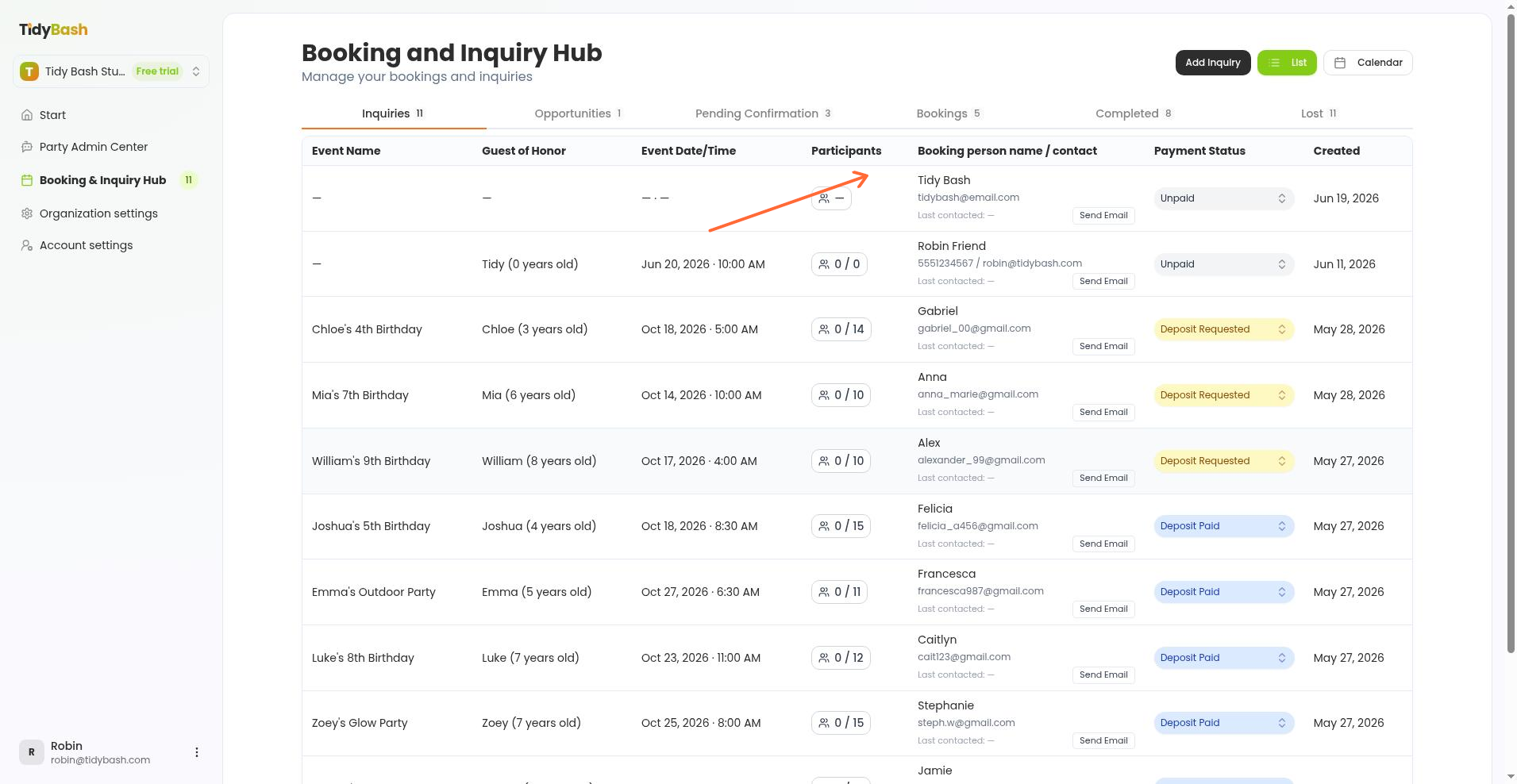
Open the inquiry to review what came through:
If the parent finished the request, you get the full picture: date, package, add-ons, guest count, and contact info.
If they stopped after contact details, you still see their name, email, and phone when they entered them. Party fields that were never filled show as — (for example event name, date, time, and participants). There is no separate “partial” or “abandoned” badge; incomplete leads sit on Inquiries like any other new inquiry.
A New Inquiries badge on the sidebar flags fresh leads so you know to check the Hub. If a parent stops after their contact details and doesn't finish within an hour, you also get an abandoned inquiry alert by email and in Notifications.
What to do next
An inquiry with solid contact info and blank party details is usually a parent who started booking and did not finish. That is a warm lead: they already chose you and tried to book.
Reach out directly from the Hub. A short note (“Saw you started a party request. Happy to help pick a date or package.”) often turns an almost-booking into a confirmed party.
For day-to-day pipeline work after you open an inquiry, use the Hub’s email tools and status tabs as you would for any other lead.