Streamline Coordination Between Parents, Guests, and Staff
Every party in Tidybash gets its own page where parents can make their own updates, guests can sign their own waivers, and staff can see what that party needs.






Loved by kids' activity & enrichment businesses that run more than parties
Party pages that handle RSVPs, waivers and day-of questions
Stay On Top of Party Updates
Parents fill in the details left open at booking and update anything that changes, without emailing you. When they do, you're notified.
A Direct Line to Party Guests
Guests RSVP and sign the waiver themselves, so you're not relaying messages through the parent to get a headcount.
A Notes Section Guests Never See
Put the day-of details where your team will find them, on the same party page the parent is using.
How Tidybash helps you streamline party coordination
Send and Edit Templated Emails with a Click
Build as many as you need: the booking confirmation, the week-before note, the thank-you afterwards. Merge fields pull in that party's details, and you can still edit the message for the party in front of you before it goes.
Set a reply-to address so when a parent answers, it reaches whoever should get it.
![The Tidybash email template editor, two columns wide: on the left a saved Deposit Request Email with its subject and a body carrying [name], [eventStart], [organizationName] and [paymentLink] placeholders and signed off from Tidybash; on the right the Available Fields list you click to insert — Party Page (Smart URL), Stripe Payment Link, Event Name, Event Start Date/Time and the rest](/_next/image?url=%2Fimages%2Fsolutions%2Femail-template-editor-v7.png&w=3840&q=75&dpl=dpl_BT979RLpY3iVXbwizyBKx5URs1sz)
Party Pages Parents Can Use to Send Invites
Parents invite their guests from the party page itself, and the invitation carries more than a date and a time.
Add whatever guests need to know: location and arrival instructions, how the afternoon runs, what to bring. Anything you'd otherwise be answering by phone on the morning.
Waivers signed in advance, no account required
If you have a waiver, it's added to the guest RSVP process automatically. They tap through, sign, and it's done. No account to create, no password to forget.
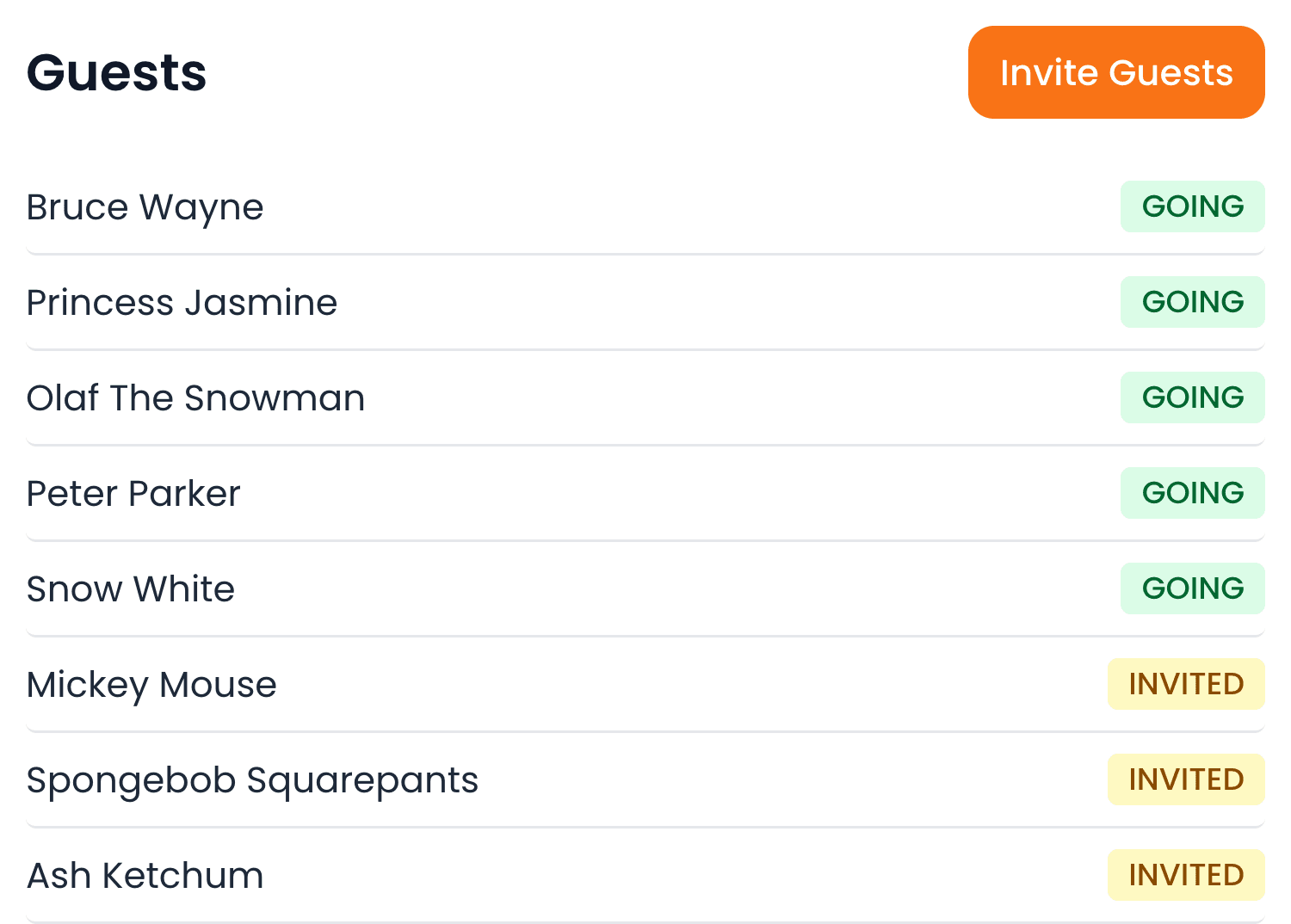
You can see who's been invited, who's replied and who's signed, days before anyone arrives.
| Name | Status | Invited | Responded | Waiver | |
|---|---|---|---|---|---|
| Bruce Wayne | Going | Sep 8 | Sep 9 | Signed | |
| Princess Jasmine | Going | Sep 8 | Sep 9 | Signed | |
| Olaf The Snowman | Going | Sep 8 | Sep 11 | Signed | |
| Peter Parker | Going | Sep 8 | Sep 12 | Signed | |
| Snow White | Going | Sep 8 | Sep 15 | Signed | |
| Mickey Mouse | Invited | Sep 8 | — | Pending |
Shareable Party Sheets for Day-of Staff
Each party page has a view that parents and staff share, with a notes section guests never see. Put the day-of details in there, then text the link to whoever is working or add it to your calendar so they have what they need without logging in.
Event Information
- Date:
- Sat 3 Oct 2026
- Time:
- 10:00 AM
- Guest of Honour:
- Marian
- Expected Guests:
- 15
Special Notes
- Parent contact if needed: (917) 555-0148.
- Set up from 9:45. Tables first, then the glow wall.
- Park in the Sixth Ave lot, not on the street.
- One guest is dairy-free. Her cake is boxed separately in the fridge.
Event Description
10:00 AM - Guests arrive
10:30 AM - Glow games
11:30 AM - Make your own glow art
12:00 PM - Pizza & cake
Settle up without chasing the balance
Take the deposit at booking and the balance when you're ready, with your own Stripe account or however you take payment now. Either way the party shows what's been paid and what's outstanding.
There's no booking fee on top. You pay standard card processing rates and nothing else.
Payment
Hide- Package & add-ons
- $900.00
- Total
- $900.00
- Paid
- $150.00
- Remaining
- $750.00
Request Stripe payment
Copy link·Send payment request
$750.00 balance — stays valid until you create a new one or it is paid.
Record Payment (manual)
“It's made checking for waivers and getting them signed so much faster. Not having to create an account makes it so much simpler for guests to use. It's really blowing my mind. I love this.”

Jesse
Movement Creative
Party Coordinated in 4 Steps
- 1
The party gets its own page.
As soon as you approve the booking, there's a page for it with everything that's been decided so far.
- 2
The parent fills in the rest.
You send them the link. They update add-ons, guest details and anything that changed since they booked.
- 3
Guests RSVP and sign.
The parent shares the page. Guests reply and sign the waiver in the same place.
- 4
Staff get the details, you get the balance.
One link for whoever is running it, and the payment status sits on the party until it's settled.
Stop scrambling to collect last-minute party details and waivers
Start free for 14 days.
Frequently Asked Questions
Can guests sign waivers without creating an account?+
Yes. They sign on the party page when they RSVP.
How do guests get invited?+
The parent invites them from the party page directly with email or by sharing a link. Guests can see all the party details, RSVP, and sign the waiver in the same place.
Do my staff need logins to see party details?+
Each party has a shareable link you can send to whoever is working it. That link opens without an account, and you can choose what information to include. To see complete details and sensitive information like payments, staff will need to log in to Tidybash.
Can I edit an email template before it goes out?+
Yes. Merge fields fill in that party's details, and you can still change the wording for the party in front of you before you send it.
Where do replies to those emails go?+
Wherever you set your reply-to address, so a parent hitting reply reaches someone who can answer.
Does Tidybash charge a booking fee?+
No. You pay Stripe's standard card processing rates and nothing on top. Tidybash takes no percentage and no per-booking fee.
How do I collect party deposits and payments?+
You can collect payments directly through Tidybash with our Stripe integration. The deposit is taken on the booking and recorded against the party automatically. If you have another payment method you prefer, take the deposit the way you normally would and record it against the booking so your numbers stay right.
What emails should I send for a party booking?+
At minimum a confirmation when you approve the booking, a note a week out with what the family needs to know, and a thank-you afterwards. Most providers add a payment reminder for the balance. Build each one as a template and it's there on every party.
What should a party confirmation email include?+
Confirm the date and start time, recap the package and the add-ons they chose, and say where the deposit and balance stand. Include the link they can share with guests to RSVP and sign the waiver, and ask for anything still missing.
What questions come up during the party booking process?+
Availability and cost come up most: is our date free, and what does a party cost and include. After that, questions about the activity itself, headcount, food and what happens on the day. We collected the 28 that come up most often here: the most common party booking questions
What is a party page?+
It's an event page created for your party in Tidybash, carrying the date, time, location and what's included. The parent updates it and invites guests, guests RSVP and sign waivers, and your staff see what they need to run it.
How do party venues collect waivers before the day?+
Most venues that require waivers send a link to the parent and ask them to pass it on, which turns into chasing signatures in the days before the party. Tidybash adds the waiver to the RSVP itself, so guest details and signed waivers are attached to the party. No cross-referencing.
Do I have to replace the software that runs my classes?+
No. Tidybash handles the party side. Your classes, camps and registrations stay where they are, and parties run alongside them.
What kinds of businesses use Tidybash's party booking software?+
Art studios, game labs, gyms, indoor playgrounds, bakeries, ski slopes and mobile entertainers. Anywhere that hosts kids' birthday parties, whether that's the main business or one of several things you run.